Everything you need to know about a multi-store eCommerce platform

Multi-store eCommerce platform

Do you have an online store? 

Does that store have multiple potential audiences or product types? 

Do you want to increase the number of leads and eventually increase your sales and Return on Investment? 

Of course, you do. The answer to all these and more is implementing a multi-store eCommerce platform for your online store.  

Wondering what a multi-store eCommerce platform is? Whether you call it multi-store, multi-site, or multi-storefront ecommerce, the concept is the same — and it’s how the fastest-growing brands manage multiple online stores without the operational chaos. In this guide, we’ll cover everything you need to know: what it is, why it matters, how to choose the right platform, and how to manage it all from one place.

Let’s start from the beginning.  

What is a multi-store eCommerce platform?

A multi-store eCommerce platform lets you run multiple online stores from one central system, while managing products, pricing, and customers separately for each store.

Most online businesses build their eCommerce site by putting all their eggs in one basket. While this approach is convenient because the vendor manages only one site, it does not work well when serving varied audiences with different needs.

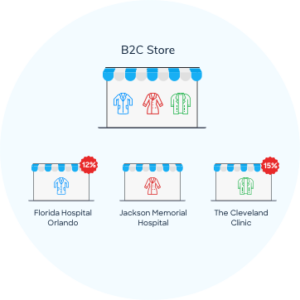
For example, consider a distributor running a B2C store that provides scrubs to several hospitals and clinics.

Instead of serving all hospitals from a single site, the distributor can create multiple stores, each dedicated to a specific hospital or clinic. They can configure each store to match that hospital’s requirements.

They can create offers that are exclusive to one store, while the other stores remain unaffected.

By managing all these stores from a single platform, they gain the flexibility to control pricing, products, and promotions for each account without maintaining multiple separate systems. This makes it easier to scale into new markets while keeping operations centralized.

The global ecommerce platform market hit $11.55 billion in 2025 and is projected to reach $61.83 billion by 2034, growing at 20.49% CAGR (Fortune Business Insights). Multi-store capabilities are a core driver of that growth — businesses that personalize shopping experiences across multiple storefronts see up to 80% higher revenue compared to single-store operations.

What are the business applications of multi-store?

A multi-store eCommerce platform has many business applications. Some of them are listed below.  

1. Capability to run multiple sites and brands

As mentioned above in the example, enterprise-level companies can offer a unique shopping experience even while handling multiple brands and not compromising on centralized services for their unique customers.  

Think of a company like Careismatic Brands, which manages separate storefronts for Cherokee, Dickies Medical, and other scrub lines — each with distinct branding, product catalogs, and pricing, all running from one platform. Multi-brand management means you control the brand experience at the storefront level while sharing inventory, order management, and reporting at the backend.

2. Niche eCommerce websites

You can create niche websites that are category, event, and promotion-specific through a customer segregation strategy and optimizing search and content to meet higher conversions.  

3. Manage multiple business models

It allows to integrate multiple business models like B2B, B2C, or even B2B2C through a single eCommerce platform. 

For distributors, this is a game-changer. You can run a B2B portal with net terms, bulk pricing, and approval workflows alongside a B2C storefront with credit card checkout and consumer pricing — all from the same admin panel. No duplicate product data. No separate inventory systems.

4. White-label websites

Manufacturers and distributors can provide a personalized experience by simplifying the buying experience through white-label websites.

White-label stores let your retailers or dealers sell under their own brand while you control the product catalog, pricing rules, and fulfillment from your master portal. This model works well for manufacturers who want to empower their channel partners without losing visibility into sales data.  

5. Multiple marketplace web stores

Set up regional eCommerce stores offering a local experience to global shoppers.  

6. Multi-Store Marketing and Promotions 

Each storefront can run its own promotions, seasonal campaigns, and loyalty programs without affecting other stores. Centralized marketing tools let you schedule campaigns across all stores at once or target specific storefronts with tailored offers. This is where the “one platform, many stores” model pays off — you get both control and flexibility.

You may check this article to know in-depth information on the key business application and how to leverage the multi-store eCommerce platform. 

5 Key Business Applications of a Multi-Store Ecommerce Platform 

Top Reasons to Implement a Multi-Store Ecommerce Strategy 

The benefits of multi-store ecommerce go both ways — your customers get a better experience, and your business runs more efficiently. Here are the top reasons brands choose to operate multiple ecommerce storefronts.

Relevant products 

Large eCommerce stores with multiple departments and verticals can do away with confusing site navigation and display products based on the audience.  

Customers know exactly what they want when they visit an online store. It would be beneficial, sales-wise, if you could take them to their desired product as quickly and in as few clicks as possible.  

Read more: Why Product Comparison Works for Ecommerce Business?

Targeted Marketing 

A multi-store ecommerce platform lets you target marketing and promotions based on your audience, marketplace, and storefront. Instead of generalized promotions that miss the mark, you can serve promotions specific to each audience based on their purchasing history, preferences, and store context. Retailers using personalized multi-store marketing report 2-3x higher conversion rates compared to one-size-fits-all approaches.

Centralized monitoring 

This is a huge benefit of implementing multi-store eCommerce, as you will have access to a master portal from which you can oversee or handle all your storefronts. You can make updates specific to a single store or publish them across all your stores. 

This also ensures that you maintain a similar brand experience across all your stores by having the final word in approvals.  

Cater to different customer types 

If you are a vendor who deals with both B2B and B2C customers, you obviously need to develop two different storefronts for each of your audiences.  

This is because the products, pricing, payment terms, and many other options differ between these two customer types.  

You may also develop B2B2B or B2B2C strategies by creating numerous websites for your dealers, distributors, retailers, and other channels.  

House multiple brands under one roof 

With multi-store eCommerce, you also have the functionality to house many of your different brands and manage them efficiently under a single platform.  

You will be able to streamline all the processes and make the most of features like eCommerce, Product Information Management, Content Management, and more.  

Leverage the platform to make more sales 

By leveraging the multi-store eCommerce platform, you will be able to build microsites and hand them over to your retailers for them to go ahead and make the sales for you.  

The best part is that you will have full control over all those sites from your master portal.  

Expand to New Geographical Territories 

You can create multiple storefronts for different geographic regions, displaying culturally relevant products, local-language content, and local-currency pricing. Customize shipping options by region. With the right platform, you can launch a new regional store in days — not months — because you’re building on existing product data, not starting from scratch. 

Internationalization and Localization: Going Global With Multi-Store 

Expanding into new markets is one of the strongest use cases for multi-store ecommerce. But going global isn’t as simple as translating your homepage. Here’s what a proper multi-store internationalization strategy looks like: 

Multi-Currency Support: Each storefront should display prices in the local currency with real-time conversion rates. Customers abandon carts when they see unfamiliar currencies — over 90% of shoppers prefer to buy in their own currency. 

Language Localization: Product descriptions, navigation labels, checkout flows, and customer communications all need to be localized. Some platforms offer built-in translation tools; others require third-party integrations. 

Regional Tax and Compliance: Different countries and regions have different tax rules, data privacy laws (like GDPR in Europe), and product regulations. Your multi-store platform needs to handle VAT, sales tax, and import duties at the storefront level. 

Country-Specific Shipping: Shipping options, carriers, delivery timeframes, and costs vary by region. Each storefront should offer locally relevant shipping methods — free next-day delivery might work in the US but not for cross-border orders. 

Local Payment Methods: Credit cards dominate in the US, but other markets prefer different payment methods. A good multi-store platform lets you configure payment gateways per storefront.

What Features Should a Multi-Store Ecommerce Platform Include? 

Not all multi-store platforms are created equal. Before choosing one, here are the features that separate a good multi-store platform from a great one: 

Centralized Dashboard: One admin panel to manage all stores. You should be able to see inventory levels, orders, and revenue across every storefront without logging into each one separately. 

Shared Product Catalog With Per-Store Customization: Products live in one database. Each store can then customize which products to show, at what price, and with what descriptions. No duplicate data entry. 

Role-Based Access Controls: Your team needs different access levels per store. A store manager for Region A shouldn’t be able to edit products in Region B’s store. 

Unified Shopping Cart: Customers who shop across your stores should be able to use a single cart and single login. This matters for multi-brand operators where cross-selling between stores drives revenue. 

Custom Themes Per Storefront: Each store needs its own look and feel — different logos, color schemes, layouts, and content — while sharing the same backend infrastructure. 

Built-In SEO Tools Per Store: Each storefront needs independent meta tags, sitemaps, canonical tags, and URL structures to avoid duplicate content penalties and rank independently in search. 

Analytics and Reporting: Track performance per store and across all stores. Revenue by storefront, conversion rates by region, top products per store — this data drives growth decisions. 

API-First Architecture: Modern multi-store platforms use APIs for everything — connecting to ERPs, CRMs, payment gateways, shipping providers, and marketing tools. An API-first approach means you can integrate with your existing tech stack without custom development. 

Integration Capabilities: Connecting Your Tech Stack 

A multi-store ecommerce platform doesn’t operate in isolation. It needs to connect to the systems you already use: 

ERP Integration: Sync orders, inventory, and financial data between your multi-store platform and your ERP (SAP, NetSuite, Microsoft Dynamics, etc.). Real-time sync prevents overselling and keeps accounting accurate across all stores. 

CRM Integration: Customer data from every storefront flows into one CRM, giving your sales and support teams a complete view of each customer’s purchase history, preferences, and interactions. 

PIM (Product Information Management): When you’re managing thousands of SKUs across multiple stores, a PIM system becomes essential. It centralizes product data — descriptions, images, specifications, pricing — and distributes it to every storefront. SellersCommerce integrates PIM natively, so product data stays consistent across all your stores. 

PIM for Ecommerce: Everything You Need to Know About Product Information Management 

Payment Gateways: Multi-store platforms need to support multiple payment processors — Stripe, PayPal, Authorize.net, and regional providers — configurable per storefront. 

Shipping and Fulfillment: Connect to carriers (FedEx, UPS, DHL) and 3PL providers. Each store can have its own shipping rules, rates, and fulfillment locations. 

Security and Compliance for Multi-Store Operations 

Running multiple stores means handling more customer data, more transactions, and more attack surface. Security isn’t optional: 

PCI DSS Compliance: Any platform processing credit card payments must be PCI compliant. This applies to every storefront, not just your primary site. 

SSL Certificates: Every storefront needs its own SSL certificate for secure connections. Most modern platforms handle this automatically, but verify during evaluation. 

Data Encryption: Customer data, order information, and payment details should be encrypted at rest and in transit across all stores. 

Role-Based Access Controls: Limit who can access what across stores. Store-level permissions prevent unauthorized changes and reduce internal risk. 

Fraud Prevention: Multi-store operators are bigger targets for fraud. Look for platforms with built-in fraud detection, IP filtering, and suspicious activity alerts.

Are there any downsides to it? 

The downside to managing multiple eCommerce sites is pretty small compared to its benefits, but are challenging, nonetheless.  

Managing data 

Handling data like inventory levels, catalogs, and customer databases on multiple sites can be pretty difficult.  

While you have the functionality to manage all those from a single platform, it can be confusing and, in a few cases, time-consuming to handle the information for so many sites. In a bid to overcome this situation, you may end up using more time, money, and resources.  

Marketing for different sites 

While marketing for different sites, you need to make sure that the same tone and message are being used across all platforms.  

That being said, it is completely different while setting up SEO for these sites. This holds true especially when you offer the same product on multiple sites, as you need to come up with different descriptions for the same product, so as to avoid creating duplicate content. 

The solution to this, however, turns this very fact into an advantage of multi-store eCommerce. While optimizing the content and website for search engines, you need to make sure that the search engines identify the uploaded content as region-specific.  While this may be a little time-consuming, it is bound to yield great results SEO-wise.  

SEO Best Practices for Multi-Store: Each storefront should have unique meta titles and descriptions, independent XML sitemaps, and proper hreflang tags for international stores. Use canonical tags to prevent duplicate content issues when products appear across multiple stores. Region-specific content and localized keywords improve rankings in local search results. 

How to Choose the Right Multi-Store Ecommerce Platform 

With dozens of platforms claiming multi-store capabilities, choosing the right one comes down to these criteria: 

  1. True Multi-Store vs. Bolt-On: Some platforms were built for multi-store from day one. Others added it as an afterthought through plugins or extensions. Native multi-store platforms handle the complexity better — shared databases, unified admin, per-store customization out of the box.
  2. B2B Feature Depth: If you serve business customers, you need features like purchase order support, net payment terms,approvalworkflows, budget caps, and tiered pricing. Many platforms built for B2C lack these capabilities. 
  3. Scalability: Can the platform handle 10 stores?100?500? Ask about performance at scale. Some platforms slow down significantly as you add storefronts because they weren’t architected for it. 
  4. Pricing Model: Watch for per-store fees, transaction fees, and bandwidth charges that multiply with each storefront. A platformthat’saffordable for one store can get expensive fast when you’re running 50. SellersCommerce, for example, charges zero per-transaction fees — meaning your costs don’t scale linearly with your sales volume. 
  5. Integration Depth: How does the platform connect to your ERP, CRM, PIM, and marketing tools? API-first platforms offer more flexibility than those relying on pre-built connectors.
  6. Time to Launch: How long does it take to launch a new storefront? Some platforms let you spin up a new store in days using existing product data and templates. Others require weeks of configuration.
  7. Support and Training: Multi-store operations are complex. Evaluate thevendor’ssupport model — do they offer dedicated account managers, onboarding assistance, and ongoing training? 

How to Implement a Multi-Store Ecommerce Strategy 

Here’s a practical roadmap for launching your multi-store operation: 

Step 1: Define Your Store Architecture. Map out how many stores you need, who each store serves, and what differentiates them (region, brand, customer type, product category). This blueprint drives every decision that follows. 

Step 2: Select Your Platform. Use the criteria above. Prioritize platforms that match your business model (B2B, B2C, or both), scale requirements, and integration needs. Get a demo. Ask to see multi-store admin in action. 

Step 3: Set Up Your Master Product Database. Centralize all product data in one place before creating individual stores. Clean, complete product data is the foundation — if your data is messy, your stores will be too. 

Step 4: Configure Individual Storefronts. Apply store-specific settings: branding, product assortment, pricing, currency, language, tax rules, shipping options, and payment methods. Start with one or two stores and expand. 

Step 5: Connect Your Integrations. Link your ERP, CRM, PIM, payment gateways, and shipping providers. Test data flow in both directions. Automation here saves hundreds of hours per year. 

Step 6: Optimize Content and SEO. Create unique content for each storefront. Set up independent sitemaps, meta tags, and hreflang tags for international stores. Avoid duplicate content across stores. 

Step 7: Test and Launch. Test checkout flows, payment processing, inventory sync, and cross-store operations. Launch in phases — don’t go live with all stores simultaneously. 

How to efficiently manage multiple stores from a single platform? 

As mentioned above, there are a few downsides to setting up an eCommerce with multiple storefronts. However, you can overcome those complexities by forming a suitable strategy. 

Below are a few tips to come up with a solid multi-store strategy. 

Set up a PIM system 

Setting up a Product Information Management system allows you to keep track of your content on all your stores in a hassle-free way.  

In addition to this, a PIM system will help you expand to multiple markets while seamlessly providing a great product experience. The best part is that it can be easily integrated with your multi-store eCommerce platform.  

Identify niches 

Instead of randomly creating multiple sites, identify niches or regional markets for each store. It is a known fact that vendors who indulge in niche marketing or who target specific niches develop brand loyalty over a period of time.  

A niche can be anything from a specific theme of the website, a region, or showcasing products for people with specific tastes.  

Optimize eCommerce content 

As mentioned above in the downsides of having a multi-store approach, you need to make sure that the content optimized does not have a duplicate or make a product from one store compete with another in a different store.  

Also, you need to come up with a formidable strategy to optimize the titles, headers, and meta tags for all the stores.  

Centralize your inventory database 

You may house multiple sites and brands under a single platform; however, that does not mean that you have to segregate the way you manage your inventory.  

Centralize your complete inventory in a single database, so that the real-time inventory updates reflect in all your sites.  

This is extremely beneficial if you sell the same product across multiple stores. Having a centralized inventory database will save you time and effort and will also prevent customers from placing orders for out-of-stock products.  

Centralize your order management 

Similar to how you centralize your inventory databases, it is also recommended to centralize your order management system as opposed to pushing orders individually from different websites.  

This means you will have to keep your fulfillment, customer care, and shipping process consistent across all your brands and stores.  

Get a Flexible and Intuitive Multi-Store Ecommerce Software 

You need a flexible and intuitive multi-store eCommerce platform like SellersCommerce to tie all these threads together. With 3,700+ stores launched and $10B+ in merchandise sales facilitated, SellersCommerce is purpose-built for distributors and manufacturers who need to manage multiple storefronts from one dashboard — whether that’s 10 stores or 500+. No per-transaction fees, no custom code required, and new stores launch in weeks, not months.   

Choosing Best Online Company Stores Platform 

Case Study: Careismatic Brands — 400+ Retailers on One Platform 

Careismatic Brands is the world’s leading health care apparel and footwear company and an innovative manufacturer/distributor of school uniforms, corporate identity uniforms, adaptive clothing, and accessories. 

Originally, Careismatic Brands used a very old program to support and help their retailers go digital and develop their own eCommerce stores.  

However, as the number of retailers grew, the platform became slow and outdated. So, they started looking for a robust platform that is also easy to use. Luckily, they found UniformMarket, our partner in providing uniform solutions. Since then, there has been no looking back for their business.  

You may read the complete case study on Careismatic Brands from here. 

How SellersCommerce Built a Fully-Customizable Multi-Store Platform That Could Support Over 400 Retailers and Their Stores 

Frequently Asked Questions 

Q1: What is multi-store ecommerce? 

Multi-store ecommerce is a platform model that lets you create and manage multiple online storefronts from a single admin panel. Each store can have its own branding, products, pricing, and customer base, while sharing a common backend for inventory, orders, and reporting. 

Q2: How do top platforms support global, multi-brand ecommerce? 

The best multi-store platforms offer multi-currency checkout, language localization, regional tax handling, and per-store branding. They let you run different brands as separate storefronts with independent look-and-feel, while managing all product data, inventory, and orders from one centralized dashboard. 

Q3: Does an ecommerce platform allow multi-storefront management? 

Yes — that’s exactly what multi-store ecommerce platforms are designed for. You manage all storefronts from one admin, with the ability to customize products, pricing, promotions, and design per store. Look for platforms with native multi-store support rather than plugin-based approaches. 

Q4: How many stores can I manage on a multi-store platform? 

It depends on the platform. Some cap you at 5-15 stores. Others, like SellersCommerce, support hundreds of storefronts — Careismatic Brands runs 400+ retailer stores on a single platform.

Q5: What’s the difference between multi-store and marketplace? 

Multi-store means one business operating multiple storefronts. A marketplace is a platform where multiple independent sellers list products (like Amazon or eBay). Some platforms support both models, but the use cases are different. 

Q6: Is multi-store ecommerce worth it for small businesses? 

If you serve different customer segments, sell in multiple regions, or manage multiple brands, multi-store makes sense regardless of company size. The key is choosing a platform that doesn’t charge per-store fees — otherwise costs can spiral quickly as you add storefronts. 


Leave a Reply